Receiving and Putaway
Receiving and putaway are the first operational steps in the warehouse workflow, covering everything from the moment an inbound shipment arrives at the dock to the point where goods are placed in their designated storage locations. Efficient receiving processes ensure accurate inventory records from the start, while effective putaway strategies maximize storage utilization and set the stage for fast, accurate order fulfillment downstream.
Industry research shows that receiving errors cost 10-50 times more to correct than preventing them upfront. A pallet misidentified at receiving ripples through the warehouse: incorrect inventory counts, failed picks, expedited vendor returns, and dissatisfied customers. Getting receiving right is the single most important control point in warehouse accuracy.
The Receiving Process
The receiving workflow begins before the truck arrives and concludes when inventory is confirmed in the warehouse management system (WMS). A well-structured receiving process balances speed (minimizing dock congestion) with accuracy (preventing inventory discrepancies).
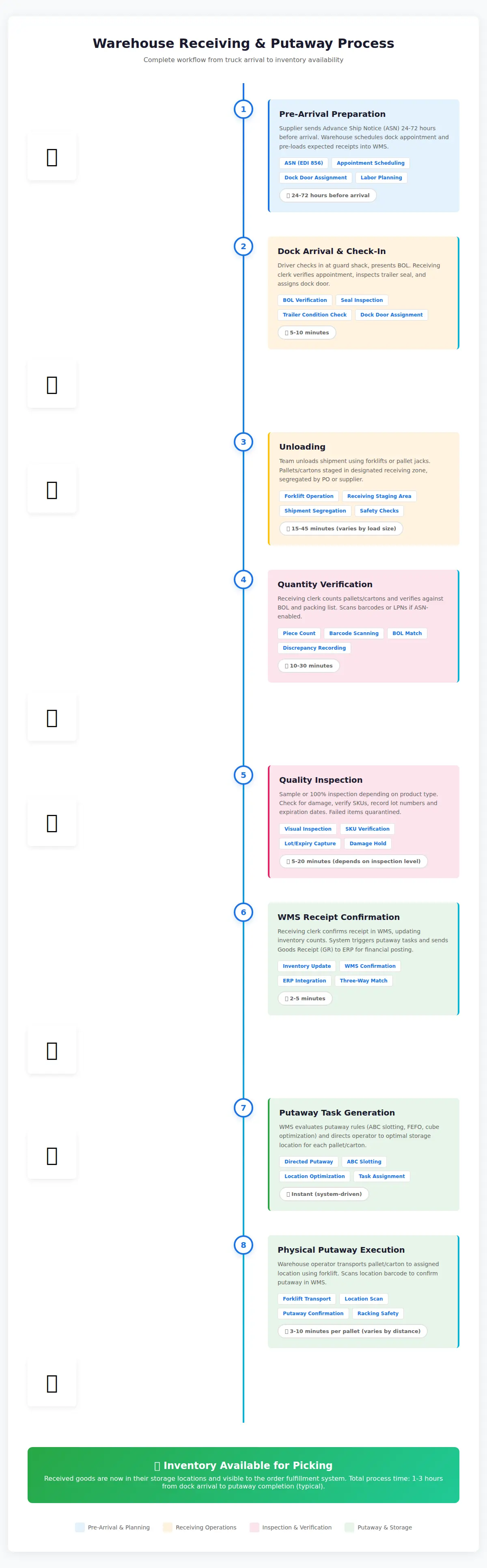
Pre-Arrival Preparation
Modern warehouses use appointment scheduling systems to control dock traffic and prevent bottlenecks. Inbound carriers book delivery time slots (often 2-4 hour windows) days or weeks in advance. This allows the warehouse to:
- Staff appropriately: Schedule receiving labor based on expected volume
- Prepare staging areas: Allocate dock doors and floor space for specific shipments
- Review purchase orders (POs): Pre-load expected receipts into the WMS
- Process ASNs: Import advance ship notice data to enable rapid verification
Advance Ship Notice (ASN) is critical for efficient receiving. An ASN is an electronic message (typically EDI 856 or XML) sent by the supplier 24-72 hours before shipment arrival, detailing:
| ASN Data Element | Purpose |
|---|---|
| Expected arrival date/time | Dock scheduling and labor planning |
| Carrier and tracking number | Shipment visibility and dock door assignment |
| Purchase order references | Link shipment to expected receipts |
| Pallet count and container IDs (SSCCs) | Pre-receive inventory before physical arrival |
| SKU-level detail (quantities, lot numbers, expiration dates) | Enable barcode verification instead of manual counting |
Warehouses that receive ASN-enabled shipments can process receiving 50-70% faster than blind receiving, according to industry benchmarks.
Dock Arrival and Check-In
When the truck arrives:
- Driver check-in: Driver presents BOL (Bill of Lading) and checks in at the guard shack or receiving office
- Appointment verification: Receiving clerk confirms the scheduled appointment and expected shipment
- Dock door assignment: Clerk directs driver to the assigned dock door
- Seal inspection: Before opening the trailer, clerk records and verifies the seal number matches the BOL
- Visual inspection: Quick check for trailer damage, proper temperature (for reefers), and load security
Trailer seals are tamper-evident security devices. If the seal number doesn't match the BOL, or the seal is broken/missing, do not unload — this indicates potential theft or contamination. Document the discrepancy and contact the carrier and supplier immediately.
Unloading
Receiving teams use appropriate equipment based on shipment type:
| Shipment Type | Equipment | Safety Considerations |
|---|---|---|
| Palletized freight | Forklift, pallet jack, electric stacker | Check pallet stability, watch for overhang, ensure floor load capacity |
| Floor-loaded containers | Conveyor, manual unloading team, pallet jacks | Confined space safety, heat stress in summer, use dock fans/lighting |
| Hanging garments (GOH) | Roller racks, garment carts | Prevent crushing, maintain product cleanliness |
| Bulk liquids/powders | Pump systems, pneumatic conveying | Spill containment, material compatibility, grounding for flammables |
Unloading best practices:
- Stage in receiving zone: Move goods to designated receiving staging area, not directly to putaway lanes
- Keep shipments segregated: Don't mix multiple POs or suppliers in the same staging area
- Preserve product integrity: Stack cartons properly, avoid dragging boxes, protect from weather/damage
Quantity Verification
The receiving team matches physical goods to the documentation. There are two approaches:
Blind Receiving
The WMS does not display expected quantities — operators count and enter actual quantities without seeing the PO or ASN. This forces an independent count and prevents "lazy receiving" where clerks simply confirm the quantity on paper without counting.
Advantages:
- Highest accuracy — eliminates confirmation bias
- Detects supplier shortages and overages
- Provides audit trail for discrepancies
Disadvantages:
- Slower — requires full manual counting
- More labor-intensive
Best for: High-value items, pharmaceuticals, controlled substances, first-time suppliers
Directed Receiving (ASN-Based)
The WMS displays expected quantities from the ASN — operators scan barcodes or LPNs and confirm "yes, this matches." If actual doesn't match expected, they enter the discrepancy.
Advantages:
- Faster — scanning replaces counting
- Less labor per shipment
- Enables rapid throughput in high-volume DCs
Disadvantages:
- Risk of confirmation bias — clerks may not notice shortages
- Dependent on accurate ASNs
Best for: Trusted suppliers with high ASN accuracy, high-volume parcel receiving, replenishment shipments
Three-Way Match
For purchases tied to accounts payable workflows, receiving data feeds into a three-way match:
- Purchase Order (PO): What you ordered
- Receiving Record: What you received (verified physically)
- Supplier Invoice: What the supplier is billing
The accounting system compares all three. If quantities and prices match within tolerance, the invoice is auto-approved for payment. Discrepancies trigger exception workflows — AP holds payment pending investigation.
Common discrepancies:
- Over-shipment: Received more than ordered → accept and adjust PO or reject excess
- Under-shipment: Received less than ordered → backorder balance, contact supplier
- Wrong item: SKU doesn't match PO → quarantine, contact supplier for RMA
- Damaged goods: Quantity correct but quality failed inspection → see Inspection section
Inspection and Quality Checks
Not all receiving inspections are equal. The depth of inspection depends on product type, supplier trust level, and business risk.
Inspection Levels
| Inspection Level | What's Checked | When to Use |
|---|---|---|
| Visual only | Carton condition, obvious damage, count verification | Trusted suppliers, non-critical goods, high-volume receiving |
| Sample inspection | Open 5-10% of cartons, verify SKU and quality | Standard receiving for most suppliers |
| 100% inspection | Open every carton, inspect every unit | High-value items, new suppliers, regulated products (medical devices, food) |
| Lot sampling (AQL) | Statistical sampling per ANSI/ASQ Z1.4 (MIL-STD-105E) | Large shipments, quality-critical manufacturing inputs |
Common Inspection Points
Physical condition:
- Carton crushing, tears, water damage
- Pallet damage, broken bands/stretch wrap
- Product damage (dents, scratches, cracks)
Quantity verification:
- Count matches BOL and packing list
- Inner pack quantities correct (e.g., case says 24 units, verify actual count)
Product attributes:
- SKU matches barcode and packing list
- Lot/batch number recorded (critical for traceability and FEFO/FIFO rotation)
- Expiration date recorded (food, pharmaceuticals, cosmetics) — reject short-dated goods based on policy
- Serial numbers captured for serialized inventory (electronics, tools, high-value items)
- Country of origin verified if required for customs compliance
Documentation completeness:
- Packing list included and matches shipment
- Certificates of analysis (COA) for raw materials
- MSDS/SDS (Material Safety Data Sheets) for hazardous materials
- Compliance certifications (organic, kosher, halal, etc.)
Exception Handling Workflow
When inspection fails, the WMS must route the discrepancy through a defined workflow:
Quarantine zones physically segregate failed goods from available inventory. Common hold areas:
- Damage hold: Goods with physical damage pending disposition
- QC hold: Awaiting lab testing or quality approval
- Returns staging: Wrong items or overages pending return to supplier
For all exceptions, capture photos, record inspector name/timestamp, and preserve original documentation. If a supplier dispute or insurance claim arises weeks later, contemporaneous evidence is critical. Many WMS platforms support mobile photo capture directly in the receiving module.
Putaway Strategies (Directed, Opportunistic)
Putaway is the process of moving received goods from the receiving staging area to their designated storage locations. The putaway strategy determines where each item goes, who decides, and how the location is selected.
Fixed Location (Dedicated Slotting)
Each SKU has a permanent home location. Every inbound shipment of that SKU goes to the same location.
Advantages:
- Simplicity: Pickers always know where to find an item
- Familiarity: Reduces training time for new staff
- Visual management: Easy to spot low stock levels
Disadvantages:
- Wasted space: Low-velocity items occupy prime pick locations even when stock is low
- Inflexibility: Seasonal surges or product mix changes require relabeling
Best for: Small warehouses, limited SKU counts (under 500), low inventory turnover variability
Random Location (Dynamic Slotting)
The WMS assigns any available location to incoming goods, optimizing space utilization. SKUs are scattered across the warehouse based on availability, not fixed assignments.
Advantages:
- Space efficiency: Every location is usable for any SKU
- Flexibility: Adapts to changing product mix and seasonal peaks
- ABC velocity optimization: Fast-movers can be dynamically slotted closer to packing as demand patterns change
Disadvantages:
- WMS dependency: Absolutely requires barcode scanning and real-time WMS — manual operations are impossible
- Complexity: Staff cannot visually locate inventory without system guidance
Best for: Large warehouses (10,000+ SKU counts), high-velocity e-commerce fulfillment, 3PLs with rotating client bases
Directed Putaway (System-Optimized)
The WMS evaluates real-time conditions and directs the putaway operator to the optimal location based on predefined rules.
Common directed putaway rules:
| Rule | Logic | Benefit |
|---|---|---|
| ABC velocity slotting | A items (fast movers) → forward pick zones; C items (slow movers) → bulk storage | Minimizes picker travel time |
| FEFO (First Expired, First Out) | Put new lot behind existing older lot in the same location | Ensures proper date rotation, reduces waste |
| Cube utilization | Direct large items to floor locations, small items to shelving | Maximizes storage density |
| Like-with-like | Keep same SKU together in adjacent locations | Simplifies replenishment and cycle counting |
| Zone balancing | Distribute similar items across multiple zones | Prevents picker congestion during peak |
| Pallet optimization | Direct full pallets to bulk storage, partial pallets/cases to forward pick | Matches storage method to unit type |
Example: A warehouse receives 10 pallets of SKU XYZ. The WMS:
- Checks current stock levels and demand forecast
- Directs 2 pallets to the forward pick zone (high velocity, easily accessible)
- Directs 8 pallets to bulk storage (reserve inventory)
- Within bulk storage, selects locations based on aisle proximity to minimize forklift travel
Best for: Medium to large warehouses with WMS, variable product velocity, high SKU diversity
Opportunistic Putaway
The operator scans the item, and the WMS suggests a location but allows override. If the suggested location is full or difficult to access, the operator can select a nearby alternative — the system accepts any valid location.
Advantages:
- Speed: Reduces putaway time when suggested locations are blocked by active picking
- Operator judgment: Experienced staff can optimize based on real-time floor conditions
- Flexibility: Handles unexpected scenarios (damaged rack, spills, congestion)
Disadvantages:
- Inconsistency: Without strict rules, inventory may scatter inefficiently
- Training dependent: Requires skilled operators who understand slotting principles
Best for: Warehouses with experienced staff, facilities with constrained or irregular layouts, hybrid manual/WMS operations
Slotting Optimization
Slotting is the science of assigning SKUs to locations based on velocity, size, and pick frequency. Warehouses reslot periodically (quarterly or seasonally) to keep high-velocity items in the most accessible locations.
Key metrics for slotting decisions:
- Pick frequency: How often is this SKU picked per day/week?
- Cube movement: Volume × pick frequency (high cube + high picks = prioritize prime locations)
- Order correlation: Which SKUs are frequently picked together? (slot them near each other to reduce travel)
- Replenishment frequency: How often must forward pick be restocked from reserve?
Slotting tools (WMS modules or standalone software) analyze historical pick data and recommend optimal slot assignments. Slotting accuracy improvements of 15-30% in pick productivity are common after a well-executed reslot.
E-commerce warehouses often reslot before peak seasons. In October, holiday décor and toys move from reserve to forward pick. In January, fitness equipment and organization products take priority. Automated slotting keeps the warehouse aligned with demand patterns.
Cross-Docking
Cross-docking is a receiving strategy where inbound goods are immediately routed to outbound shipping without entering storage. Items move from receiving dock directly across the facility to shipping dock — hence "cross-dock."
When Cross-Docking Makes Sense
Cross-docking is most effective when:
- Pre-allocated inventory: Goods arrive already assigned to specific customer orders (e.g., supplier drop-ships to retailer distribution center)
- Fast-moving consumables: High-velocity products that would be picked within hours anyway (fresh produce, daily newspapers)
- Consolidation hubs: Combining LTL shipments from multiple suppliers into FTL loads for final delivery
- Just-in-time manufacturing: Components delivered directly to production lines without warehousing
Types of cross-docking:
| Type | Description | Example |
|---|---|---|
| Pre-distributed | Supplier pre-sorts and labels goods by destination; no warehouse sorting needed | Retail DC receiving floor-ready merchandise for stores |
| Consolidation | Combine multiple small shipments into full truckloads | LTL freight terminal consolidating parcels for regional delivery |
| Deconsolidation | Break bulk shipments into smaller orders | Grocery distributor receiving full containers, breaking to store-specific orders |
| Opportunistic | Inbound shipment happens to match pending outbound order | E-commerce warehouse receives product, immediately picks for waiting order |
Cross-Docking Workflow
Key success factors for cross-docking:
- Accurate ASNs: Must know exactly what's arriving and where it's going before the truck arrives
- Tight time windows: Inbound and outbound schedules must align (typically within 24 hours)
- Dedicated dock doors: Separate cross-dock staging area to prevent confusion with standard receiving
- WMS support: System must flag cross-dock items and route them directly to outbound without putaway tasks
Benefits and Challenges
Benefits:
- Reduced handling costs: No putaway, storage, or replenishment labor
- Faster cycle time: Goods ship within hours instead of days
- Lower storage costs: Minimal or zero warehouse space consumed
- Reduced inventory holding costs: No capital tied up in stored inventory
Challenges:
- Coordination complexity: Requires tight supplier and carrier synchronization
- Limited flexibility: If outbound shipment is delayed, cross-dock goods have nowhere to go
- Space constraints: Requires significant cross-dock staging area (often 20-30% of dock space)
- Demand volatility: Works best with predictable demand; disruptions create chaos
While cross-docking eliminates storage costs, it increases coordination costs and transportation costs (more frequent, smaller shipments). Calculate total landed cost including transportation before assuming cross-docking is optimal. For slow-moving items or unpredictable demand, traditional warehousing may be more economical.
Receiving Documentation
Accurate receiving documentation creates the audit trail that ties physical inventory to financial records. Key documents include:
Bill of Lading (BOL)
The BOL is the carrier's receipt for goods and serves as the contract of carriage. In receiving:
- Carrier copy: Signed by receiving clerk to confirm delivery
- Shipper copy: Proof that carrier picked up goods
- Consignee copy: Warehouse retains this for records
Key BOL fields for receiving:
- Shipper and consignee names/addresses
- PO number (if available)
- Freight class and weight (for LTL)
- Pallet/piece count
- Seal number (if applicable)
- Carrier PRO number or tracking number
The receiving clerk signs the BOL only after verifying piece count. Signing "subject to inspection" or noting "3 pallets damaged" protects the consignee's right to file claims.
Packing List
The packing list (or packing slip) details the contents of the shipment:
- SKU, description, and quantity for each line item
- Lot numbers and expiration dates (if applicable)
- Carton breakdown (which SKUs are in which cartons)
Receiving teams use the packing list to verify contents against the PO. If the packing list is missing, receiving must perform blind verification or contact the supplier for electronic documentation.
Delivery Receipt (Proof of Delivery)
The delivery receipt is the warehouse's internal record of what was received. It typically includes:
- Date and time of receipt
- Receiving clerk name
- BOL number and carrier name
- PO reference
- Quantity received (as verified)
- Condition notes (damage, shortages, exceptions)
This document feeds into the WMS receiving module and accounts payable for three-way matching.
Advanced Ship Notice (ASN)
As discussed earlier, the ASN is an electronic pre-notification of shipment contents. It arrives via:
- EDI 856 (ANSI X12 standard for ASN)
- XML message via API integration
- Portal upload (supplier logs into warehouse portal, uploads shipment details)
The ASN becomes the expected receipt in the WMS. When the shipment arrives, receiving scans barcodes and the system validates against the ASN, auto-confirming receipt if everything matches.
Goods Receipt (GR) in ERP
Once physical receiving is complete, the WMS transmits a Goods Receipt (GR) transaction to the ERP system (SAP, Oracle, NetSuite, etc.). This:
- Updates inventory quantities in financials
- Triggers the next step in the three-way match
- Creates an accounts payable liability (if the PO is invoiced)
ERP integration is critical — without it, finance teams have no visibility into what inventory was received, creating reconciliation headaches at month-end.
Document Retention
Receiving documentation must be retained for audit and legal purposes. Common retention policies:
- BOLs and packing lists: 7 years (matches IRS records retention for tax purposes)
- Delivery receipts: 3-5 years (internal audit trail)
- Photos of damaged goods: Until claim is resolved + 2 years
Many warehouses now scan or photograph all receiving documents and store them in document management systems linked to the WMS for easy retrieval during audits or disputes.
Resources
| Resource | Description | Link |
|---|---|---|
| WERC Warehouse Best Practices | Warehouse Education and Research Council — receiving process benchmarks and best practices | werc.org |
| MHI Receiving Standards | Material Handling Institute — equipment and process standards for safe receiving operations | mhi.org |
| GS1 ASN Implementation Guide | How to structure and transmit EDI 856 Advance Ship Notices for accurate receiving | gs1us.org/edi-856 |
| OSHA Dock Safety Guidelines | Occupational Safety and Health Administration — dock door safety, forklift operation, and receiving area protocols | osha.gov |
| APICS Warehouse Management Body of Knowledge | Comprehensive reference for warehouse receiving, putaway, and inventory control processes | ascm.org |
Related Topics
- Warehouse Zones — understanding how receiving flows into different storage zones
- Labels & Barcoding — LPN creation and barcode scanning in receiving workflows
- Pallets & Unit Loads — pallet handling and safety in receiving operations
- Picking & Packing — how putaway strategies impact downstream picking efficiency
- Inventory Management — maintaining inventory accuracy after receiving
- Bill of Lading (BOL) — detailed explanation of trucking BOL documents used in receiving