Shipping Labels
The shipping label is the single most critical element of parcel delivery. It carries all the information needed to route a package from sender to recipient — the destination address, tracking number, service level, routing codes, and machine-readable barcodes that enable automated sorting across the carrier network. A properly formatted shipping label ensures fast, accurate delivery; a flawed one can result in delays, misroutes, or lost packages.
Understanding shipping label anatomy, barcode standards, and carrier-specific requirements is essential for anyone shipping parcels — whether you're an e-commerce seller, warehouse operator, or logistics professional.
What is a Shipping Label
A shipping label is a document affixed to the outside of a package that provides:
- Addressing information — sender (return address) and recipient (destination address)
- Service identification — the carrier and service level (e.g., UPS Ground, FedEx Express, USPS Priority Mail)
- Tracking number — a unique identifier that enables shipment visibility
- Routing codes — internal carrier codes that direct the package through sorting facilities
- Machine-readable barcodes — 1D and 2D barcodes that allow automated scanning and tracking
The standard size for parcel shipping labels in the United States is 4 × 6 inches, printed on thermal or adhesive label stock. This size is used by USPS, UPS, FedEx, and DHL for domestic shipments.
Thermal printers are the industry standard for shipping labels because they produce durable, scannable labels quickly without ink or toner. Direct thermal labels (heat-sensitive paper) work for short-term use; thermal transfer labels (ribbon-based) are more durable for long storage or extreme conditions.
Anatomy of a Shipping Label
Every carrier's label has a similar structure, divided into key zones. The following diagram shows a standard 4×6 inch parcel shipping label with all major elements annotated:
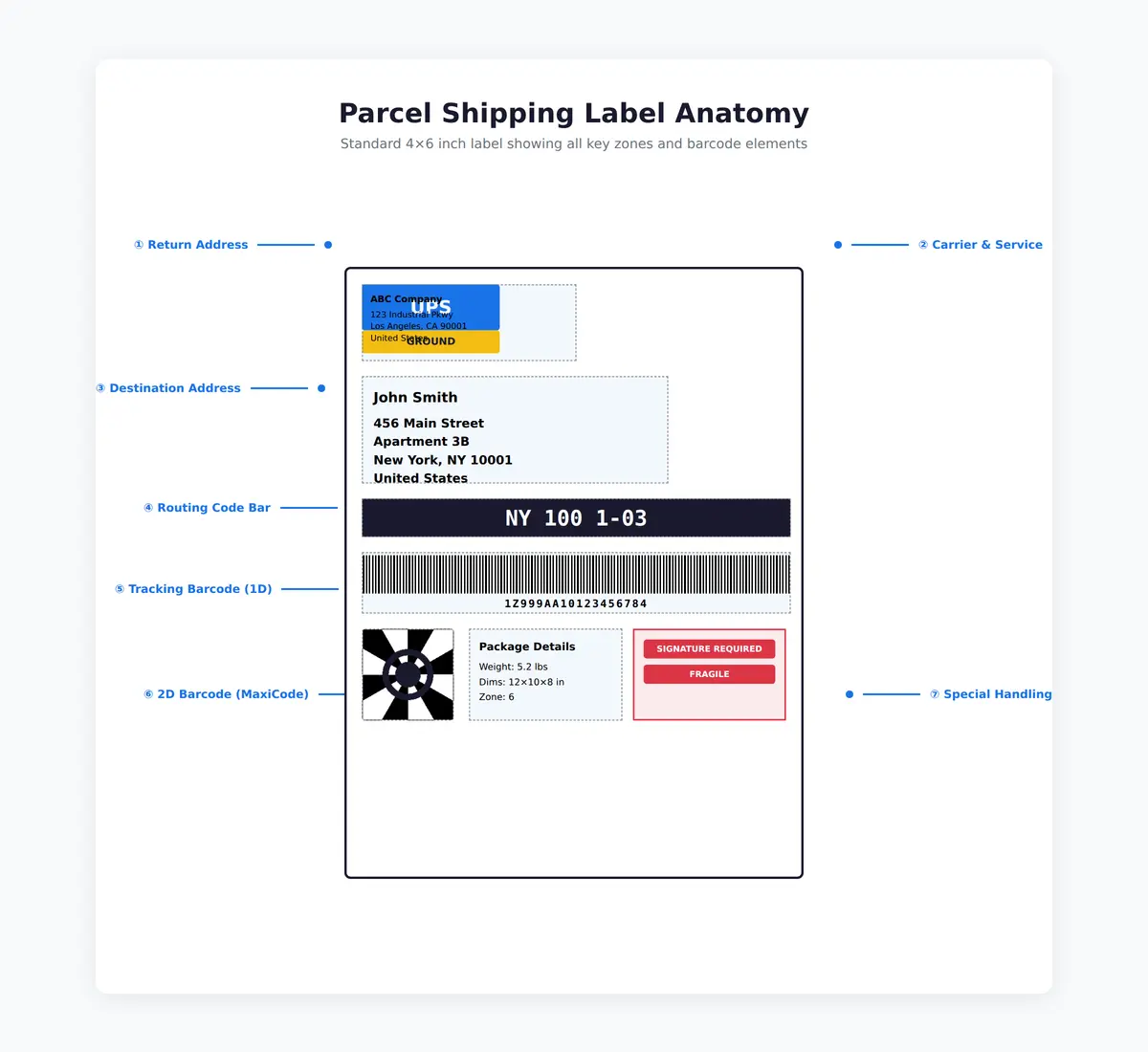
The label is organized into distinct zones to facilitate both human readability and automated scanning at carrier sorting facilities. Below is a detailed explanation of each zone:
1. Return Address (Shipper)
The top-left section contains the sender's address — the "from" location. If the package is undeliverable, the carrier will return it to this address. This zone must include:
- Sender name (individual or company)
- Street address
- City, state, ZIP code
- Country (for international shipments)
2. Destination Address (Consignee)
The largest and most prominent section, typically center or center-left. This is the recipient's address — the "to" location. It must be printed in a clear, scannable format:
- Recipient name
- Street address (including apartment/suite number)
- City, state, ZIP code
- Country (for international shipments)
Address formatting errors are the leading cause of delivery exceptions. Always validate addresses against postal databases (USPS Address Validation API, UPS Address Validation, etc.) before printing labels.
3. Service Type & Carrier Logo
Displays the carrier name (UPS, FedEx, USPS, DHL) and the service level (Ground, Express, Priority, etc.). This helps handlers quickly identify how the package should be processed.
4. Routing Code
A machine-readable bar or alphanumeric code that tells carrier sorting systems where to route the package next. UPS routing codes often start with a state abbreviation and ZIP prefix (e.g., "CA 900 9-06"). FedEx uses SCNC (Service Center and Network Code) routing.
5. Tracking Number (1D Barcode)
The tracking number barcode — typically Code 128 format — encodes the unique tracking identifier. This is scanned at every touchpoint (pickup, sorting hub, delivery) to update shipment status.
| Carrier | Tracking Number Format | Example |
|---|---|---|
| UPS | 18 digits, starts with "1Z" | 1Z999AA10123456784 |
| FedEx Ground/Express | 12-14 digits | 1234 5678 9012 |
| USPS | 20-22 digits, format AA 000000000 US | 9400 1000 0000 0000 0000 00 |
| DHL | 10-11 digits | 1234567890 |
6. 2D Barcode (MaxiCode or IMpb)
A two-dimensional barcode that encodes more information than a 1D barcode, including routing data, tracking number, service type, and destination ZIP code. This allows faster, more accurate automated sorting.
| Carrier | 2D Barcode Type | Purpose |
|---|---|---|
| UPS | MaxiCode | Encodes tracking number, service code, destination ZIP, country |
| FedEx | PDF417 or DataMatrix | Encodes tracking number, service, routing |
| USPS | Intelligent Mail Package Barcode (IMpb) | GS1-128 format encoding ZIP, tracking, and service |
| DHL | DataMatrix | Encodes tracking, destination, service |
MaxiCode is a fixed-size 2D barcode developed by UPS. It looks like a bullseye (concentric circles) surrounded by a grid of hexagonal dots. MaxiCode can be read even if the label is damaged or crinkled up to 25%, making it ideal for high-speed sorting. It encodes up to 93 alphanumeric characters.
7. Weight & Package Information
Displays the package's weight (in pounds or kilograms) and sometimes dimensions. This information is used for rate calculation and ensures the package was charged correctly.
8. Special Handling Marks
Indicators for special services or handling requirements:
- Signature Required — recipient must sign for delivery
- Fragile — handle with care
- Perishable — time-sensitive delivery
- Hazmat — dangerous goods (requires special labeling per DOT/IATA regulations)
- Saturday Delivery — premium service for weekend delivery
- Adult Signature — age verification required (alcohol, tobacco)
Barcode Types on Shipping Labels
Shipping labels use multiple barcode formats to encode different types of information. Understanding these helps troubleshoot scanning issues and ensure label quality.
Code 128 (1D Barcode)
Code 128 is the most common 1D (linear) barcode used for tracking numbers. It is defined by ISO/IEC 15417 and can encode all 128 ASCII characters.
- High density — encodes more data per inch than older formats (Code 39)
- Error checking — includes a checksum digit to detect scanning errors
- Variable length — can encode tracking numbers of any length
GS1-128 is a variant used by USPS for the Intelligent Mail Package Barcode (IMpb), which combines tracking number and destination ZIP code in a single barcode.
FedEx barcodes must be nearly perfect to scan — damage tolerance is low. USPS IMpb barcodes are more forgiving and can often scan with minor damage. Always protect labels from moisture and tearing during transit.
MaxiCode (2D Barcode)
MaxiCode is a fixed-size 2D barcode developed by UPS for high-speed automated sorting. It consists of a bullseye finder pattern (concentric circles) surrounded by hexagonal modules.
Key features:
- Fixed size: 1 inch × 1 inch (2.5 cm × 2.5 cm)
- Capacity: 93 alphanumeric characters (Mode 2/3), 74 characters (Mode 5 secure)
- Error correction: Reed-Solomon error correction allows scanning even with up to 30% damage
- Omnidirectional scanning: Can be read from any angle without rotating the label
Mode types:
- Mode 2: U.S. domestic shipments (numeric ZIP code)
- Mode 3: International shipments (alphanumeric postal code)
- Mode 4/5: General data encoding (non-shipping applications)
Intelligent Mail Package Barcode (IMpb)
IMpb is the USPS standard for package tracking, encoded using GS1-128 (Code 128 variant). It combines the destination routing information (ZIP code) with the package identification code (tracking number) into a single barcode.
Structure:
- Application Identifier (AI) 420 for destination ZIP code
- Application Identifier (AI) 96 for package tracking number
- Encoded as a single linear barcode on the label
Example IMpb format:
(420)90210(96)1234567890123456789012
This encodes ZIP 90210 and a 24-digit tracking number.
PDF417 and DataMatrix (FedEx, DHL)
PDF417 is a stacked linear barcode (looks like multiple 1D barcodes stacked vertically). DataMatrix is a square 2D barcode made of black and white cells arranged in a grid.
Both are used by FedEx and DHL to encode:
- Tracking number
- Service type
- Destination routing
- Package weight
- Customs data (for international shipments)
Label Generation Workflow
Shipping labels are typically generated through one of these methods:
Carrier Websites (Manual Entry)
For low-volume shippers, carriers provide web portals for creating labels:
- USPS Click-N-Ship: usps.com/ship
- UPS Internet Shipping: ups.com
- FedEx Ship Manager: fedex.com
- DHL Express Shipping: dhl.com
You enter package details (weight, dimensions, destination) and print a label. The carrier assigns a tracking number when the label is created.
Shipping Software Platforms
For e-commerce and high-volume shippers, third-party platforms aggregate carrier APIs:
- ShipStation — integrates with 300+ marketplaces and carriers
- Shippo — multi-carrier label API with rate shopping
- EasyPost — shipping API for developers
- Pirate Ship — simple USPS and UPS label generation
These platforms automatically import orders from your e-commerce system (Shopify, WooCommerce, Amazon, etc.), calculate rates across carriers, and generate labels in bulk.
Direct Carrier APIs
Developers can integrate directly with carrier APIs for full control:
| Carrier | API Documentation | Authentication |
|---|---|---|
| USPS | USPS Web Tools | User ID (free registration) |
| UPS | UPS Developer Portal | OAuth 2.0 (application credentials) |
| FedEx | FedEx Developer Portal | API key (account required) |
| DHL | DHL Developer Portal | API key (account required) |
Best Practices for Shipping Labels
1. Validate Addresses Before Printing
Use carrier address validation APIs to correct errors before creating labels. This reduces delivery exceptions and returns.
2. Use High-Quality Thermal Printers
Invest in a thermal label printer (Zebra, Rollo, Dymo 4XL). Inkjet and laser printers produce labels prone to smudging and scanning issues.
3. Print at Correct DPI
Shipping labels should be printed at 203 DPI (dots per inch) minimum. Higher DPI (300 DPI) produces sharper barcodes with better scan rates.
4. Protect Labels from Moisture
Use waterproof label stock or cover labels with clear packing tape. Moisture can blur barcodes and make labels unreadable.
5. Remove Old Labels
Always remove or completely cover old shipping labels before affixing a new one. Carriers may scan the wrong barcode, sending the package to the wrong destination.
6. Verify Barcode Scannability
After printing, scan the barcode with a handheld scanner to ensure it's readable. If it doesn't scan, reprint the label.
Common Label Problems and Fixes
| Problem | Cause | Solution |
|---|---|---|
| Barcode won't scan | Low print quality, smudged ink | Increase DPI, use thermal printer, verify label quality |
| Package misrouted | Old label not removed | Remove or fully cover all old labels before affixing new one |
| Delivery exception: address error | Invalid or incomplete address | Use carrier address validation API before label creation |
| Label falls off in transit | Poor adhesive, wet conditions | Use high-quality adhesive labels, protect with clear tape |
| Tracking not updating | Barcode not scanned at pickup | Ensure carrier scans package at pickup; request pickup receipt |
Resources
| Resource | Description | Link |
|---|---|---|
| USPS Click-N-Ship | Create and print USPS shipping labels online | usps.com/ship |
| UPS Internet Shipping | Create UPS labels and schedule pickups | ups.com |
| FedEx Ship Manager | Create FedEx labels and manage shipments | fedex.com |
| USPS Address Validation | Verify and standardize U.S. addresses | usps.com/business/web-tools-apis |
| GS1 Barcode Standards | Official barcode specifications including Code 128 | gs1.org |
Related Topics
- Tracking & Visibility — how tracking numbers are used to monitor shipments
- Last-Mile Delivery — the final step after the label gets the package to your door
- Rate Shopping — comparing carrier rates before generating labels